DecoderPro® Main Window
JMRI® Throttle Window - Toolbar
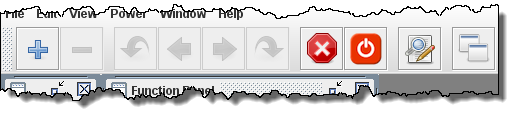
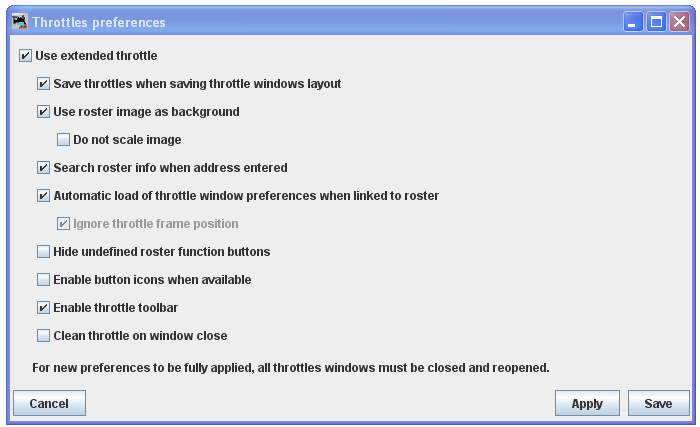
The Throttle toolbar is enabled from the Throttles Preferences Pane
Use Throttles preferences window to set the desired preferences.
When it is enabled, a Throttle Window can host a set of Throttles. You can browse through these throttles: Add a new Throttle in that Throttle Window. Once the number of Throttles in a Throttle Window is greater than one, Next and Previous Icons are enabled.
 Open a new Throttle Window
 Closes the current Throttle
Window
Closes the current Throttle
Window Return to Previous running
Locomotive.
Return to Previous running
Locomotive. Goes to previous
throttle.
Goes to previous
throttle. Goes to next
throttle
Goes to next
throttle Goes to next
running locomotive
Goes to next
running locomotive Issues an emergency stop
command to all locomotives under JMRI control.
Issues an emergency stop
command to all locomotives under JMRI control. Controls track power on
or off, if supported.
Controls track power on
or off, if supported. Switch to or revert from Edit
Throttle mode.
Switch to or revert from Edit
Throttle mode. Opens the Local JMRI Window
Thanks and congratulations to all who contributed!
Copyright © 1997 - 2018 JMRI Community.
JMRI®, DecoderPro®, PanelPro™, SignalPro™, TrainPro™, DispatcherPro™, OperationsPro™ and associated logos are our trademarks.
Additional information on copyright, trademarks and licenses is linked here.
Contact us via the JMRI users Groups.io group.
Site hosted by:

See also the site status page.